
What is an app for, once AI does the editing?
One source of truth, many generated views, and six operations that people and agents share.
This week I spent an evening on ArtCraft’s site. It’s an open-source studio that has rebuilt thirteen creative and office apps in Rust: a word processor, a spreadsheet, a deck tool, vector, video, CAD and more. Their word processor exposes 389 commands, and the same commands drive the ribbon, the keyboard shortcuts, a command-line tool, a JSON control channel and an MCP server.
That left me with a question I couldn’t put down. If anything can be cloned, and an AI is doing a growing share of the editing, what is an app actually for?
The obvious answer has been tried
My first thought was one universal file format. Put everything in one structure and make every app a viewer.
That has been tried: OLE, OpenDoc, ODF. None of them became the one format everything lives in, and not only because of politics. The structure in each domain is real. Video has time. Spreadsheets have dependencies between cells. Vector art has geometry. Flatten all of that into one format and you get the lowest common denominator.
What does generalise
What ArtCraft built isn’t a universal format. It’s a universal operation layer: named commands that the UI, the CLI and an agent all call the same way. That part does generalise.
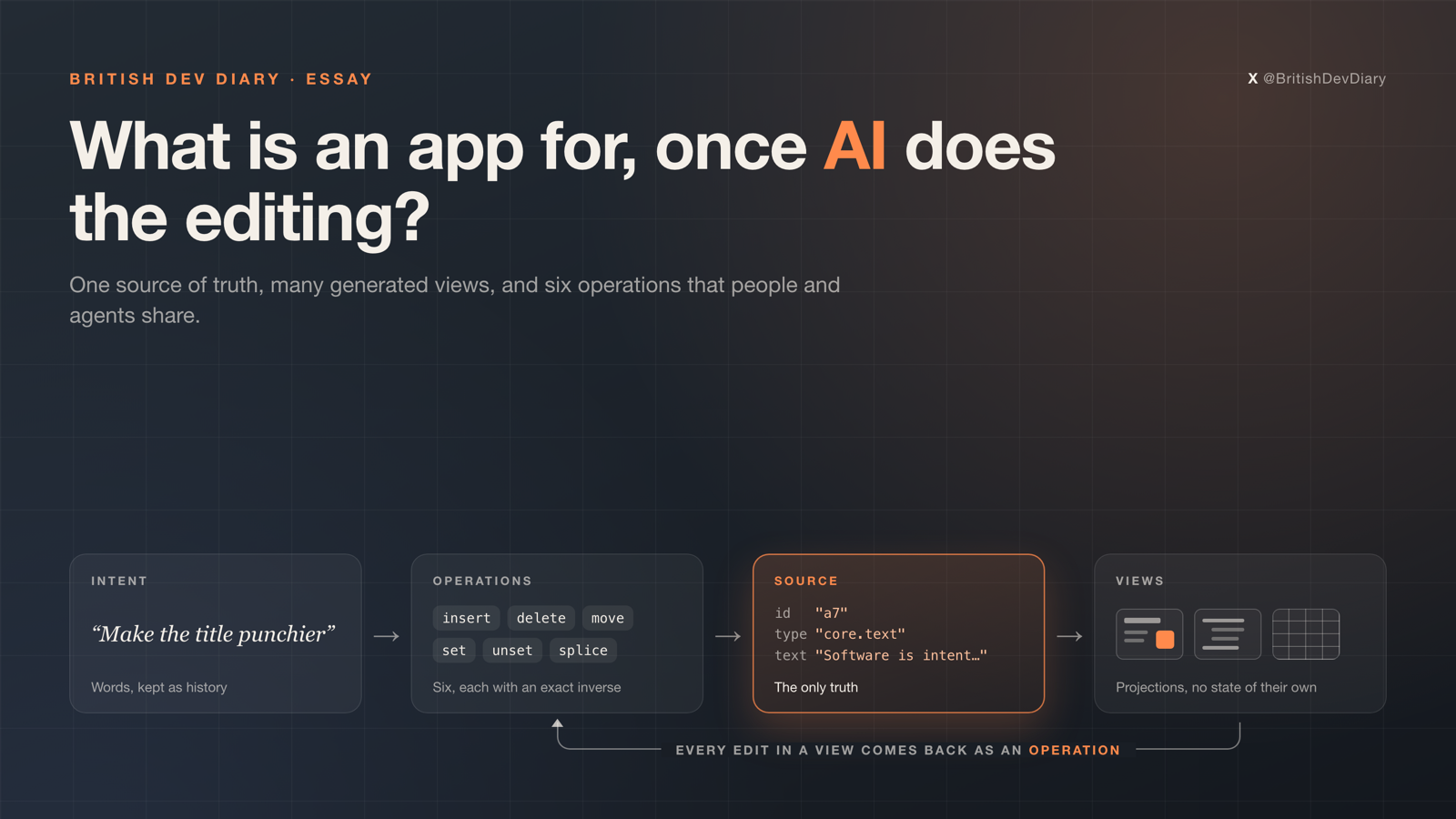
Push it one step further and you get the idea I’ve now written a spec for. Three levels:
- Intent. What someone wants, in words. Kept as history on every change, never as the truth, because prose regenerates differently every time.
- Source. A plain-text tree of typed nodes, each with a permanent id. The only truth.
- Views. A canvas, an outline, a grid, a timeline. Each one is a projection of the source. A view holds no state of its own and writes back only through operations.
Close every view and nothing is lost. A slide title looks like this in the source:
{ "id": "a7", "type": "core.text",
  "props": { "role": "title", "text": "Software is intent made durable",
             "frame": [120, 120, 1680, 160] } }
Six operations
Every change, in any domain, is one of six operations: insert, delete, move, set, unset and splice. Richer commands like duplicating a slide, inserting a row or trimming a clip are named macros that compile down to those six.
Each operation has an exact inverse, which gives you undo, history, replay and merging without extra work. Operations travel in transactions that record who made the change and why. So when Claude edits the deck, the log holds “make the title punchier” next to the one line that changed.
The test I care about most is small: drag a shape on the canvas, and the git diff is one changed frame line. If that holds, a session’s git history reads like a changelog.
The hard part
Projectional editors aren’t new. JetBrains MPS is the best known, and the hard part is always the same one: turning a gesture in a view back into a clean change to the source. I’ve split it into three tiers.
- Direct. The thing on screen is one prop of one node. Drag a shape and it becomes
set(frame). - Declared. One gesture touches several nodes in a known way, so the view ships its own inverse. Reorder bullets in the outline and it becomes a move.
- No inverse exists. Give a model the source plus the view before and after, ask it to propose a transaction, and show the person the diff to accept.
Tier 3 is the bet. It’s the piece that wasn’t realistic ten years ago, and I don’t know yet whether it’s reliable. The prototype will measure how often it’s needed and how often its proposal is accepted unchanged.
What I’m building first
A macOS app in Swift for slides, with two views (a canvas and an outline) plus a CLI and an MCP server over the same core. Slides come first because they have an obvious visual view and an obvious structural one, and they need only a handful of types. The headless core, a Swift package with no UI, went in today.
An agent gets the same operations as the UI, plus two tools that matter more than the rest: one renders any view to an image so it can check its own work, and one tells it what the person has selected.
How this could fail
- “Universal” collapses into lowest common denominator the moment a second domain arrives. So straight after slides, a spreadsheet pack goes on the same core. If the core has to bend, I’ll know quickly.
- Tier 3 might not be reliable enough, which would leave some views one-way.
- Two devices editing at once needs more than the simple rebasing in v0. That’s out of scope until the round trip works.
None of this is proven. Today it’s a spec, one example file and the first day of a Swift package. I’ll write up what breaks.
If you’ve worked on a projectional editor, I’d like to hear where it hurt.